Social Media Automation for Agencies: Scale Output Without Losing Review
Definition: Social media automation for agencies is a client-workflow system that turns brand profiles, source inputs, approval rules, schedules, and connected social accounts into repeatable publishing operations. The goal is not replacing account managers. The goal is increasing throughput while keeping client context, review state, and platform risk visible.
Agencies do not fail at social because they cannot write captions. They fail because every client adds a second calendar, a second voice, a second approval loop, and a second set of platform permissions. Work expands in rows, not in ideas.
SMMClaw is built around that agency reality.
The misconception
The wrong promise is "do more posts with fewer people." That attracts churn. The better promise is "make every account manager operate with a cleaner system." Automation should reduce copy-paste labor, not erase accountability.
Agency workflow map
- Client profile: voice, offer, audience, forbidden claims, competitors, approvals.
- Source intake: RSS, client notes, URLs, campaign docs, product updates.
- Draft generation: platform-specific versions with client context.
- Review queue: edit, approve, reject, or request revision.
- Schedule: recurring jobs and campaign drops.
- Publish log: account, platform, post, status, failure reason.
- Backlinks and surfaces: SMMClaw, ClawPoster, SMM Agent, and the SMM Agent dashboard.
Evidence from platform constraints
Client publishing depends on platform-specific permissions. LinkedIn's Posts API handles member and organization publishing through its own marketing surface. X documents post creation through its manage posts API. YouTube upload behavior lives under videos.insert. TikTok has a Direct Post API.
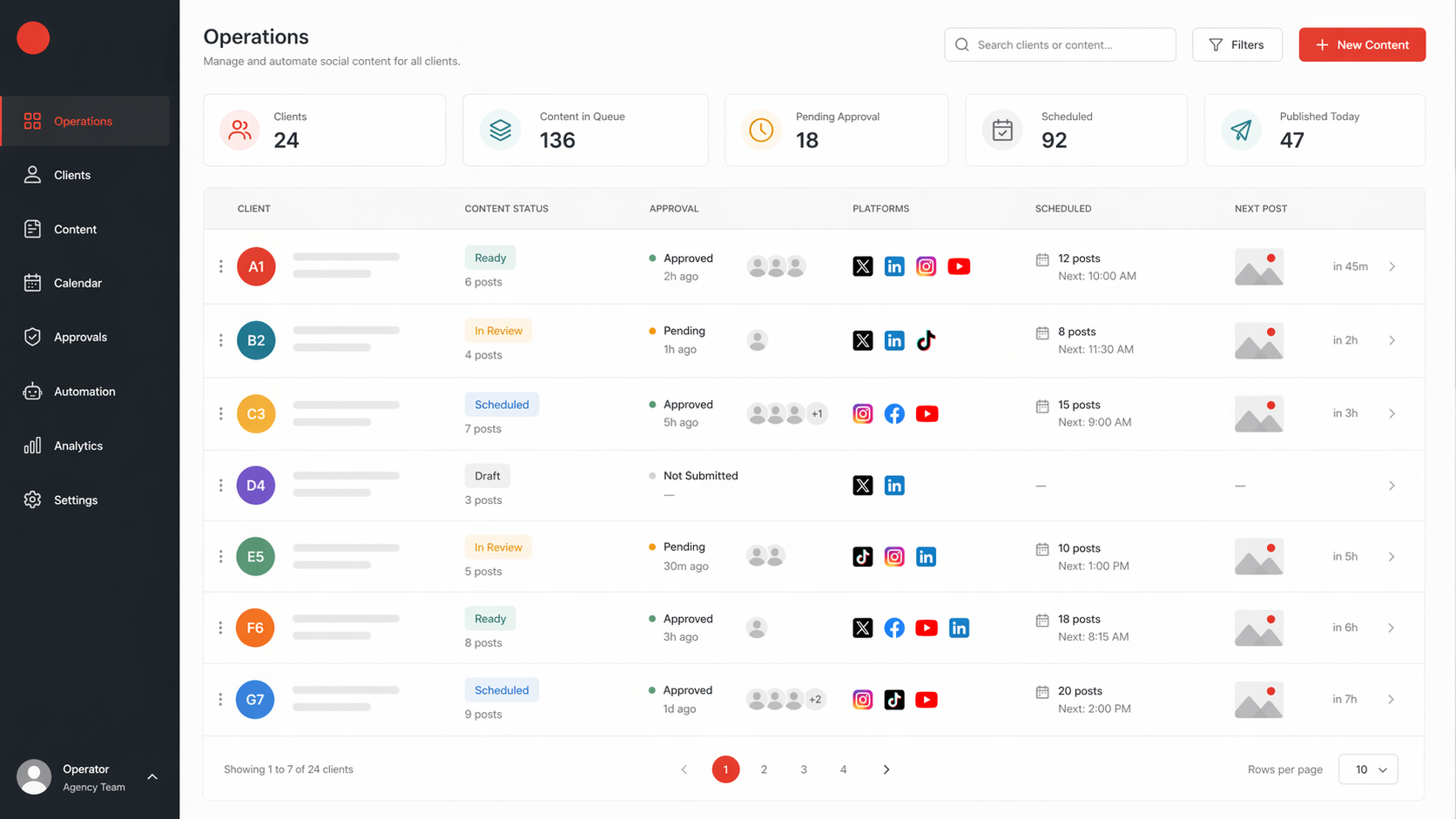
For an agency, those differences become operational risk. A missing permission for one client should not block every other client. A failed TikTok upload should not make the LinkedIn queue ambiguous. That is why the table view matters.
Old way vs new way
Old way: One spreadsheet for content, one folder for briefs, platform tabs for publishing, Slack for approvals, and a project manager acting as the integration layer.
New way: Every client has a workspace. Every workspace has profiles, sources, keys, connected accounts, schedules, and logs. The agency reviews exceptions instead of manually moving every caption between systems.
Reality contact
The first version of automation many agencies try is too broad. It promises ten clients, eight networks, replies, images, video, and full autonomy in one launch. The failure is predictable: approval quality drops, the team loses trust, and the system becomes another tab to babysit.
The rollback is to automate one narrow lane: source to draft to approval for two platforms. Once the team trusts the logs, add scheduling. Once scheduling is boring, add more platforms. Once platform publishing is stable, add replies.
Implementation checklist
- Create one workspace per client.
- Store model keys and provider settings at the workspace level when clients bring their own providers.
- Make untested keys unusable for model selection.
- Keep approval status visible in table form.
- Use per-client schedules instead of one global calendar.
- Log every failed publish with the platform response.
- Give account managers edit rights without giving every person integration admin rights.
Quantified example
An agency with 10 clients, 3 posts per week, and 3 platforms is managing 90 platform-specific outputs each week. If each output takes 8 minutes to adapt, that is 12 hours of formatting before strategy, review, or reporting. Cutting adaptation time in half gives the team 6 hours back without reducing client oversight.
Primary action
Pick one repeatable client workflow and turn it into a table: client, source, draft status, approval owner, schedule, platform, publish status, and failure reason.
Secondary actions:
- Add source-backed drafting for clients with regular news or product updates.
- Add custom model keys only after key testing and masking are implemented.
- Add reply automation last, because replies carry higher brand and relationship risk.
FAQ
What is social media automation for agencies? It is a system for producing, approving, scheduling, and publishing client social content with reusable profiles, connected accounts, and visible operational state.
Why does it matter? Agencies scale by reducing repeated process work while protecting client judgment.
How does it work? Each client gets a workspace with profiles, sources, drafts, approvals, schedules, and platform logs.
What are the risks? Over-automation, weak approval controls, permission failures, stale sources, and unclear accountability.
Conclusion
The tension is scale versus review. Agencies need more output, but clients pay for judgment. Automation is useful only when it gives the team more room for judgment.
The uncomfortable part: if nobody owns the approval state, the agency is not automated; it is just faster at losing context.
Ready to automate your social posting?
Join the waitlist for early access to SMMClaw.